

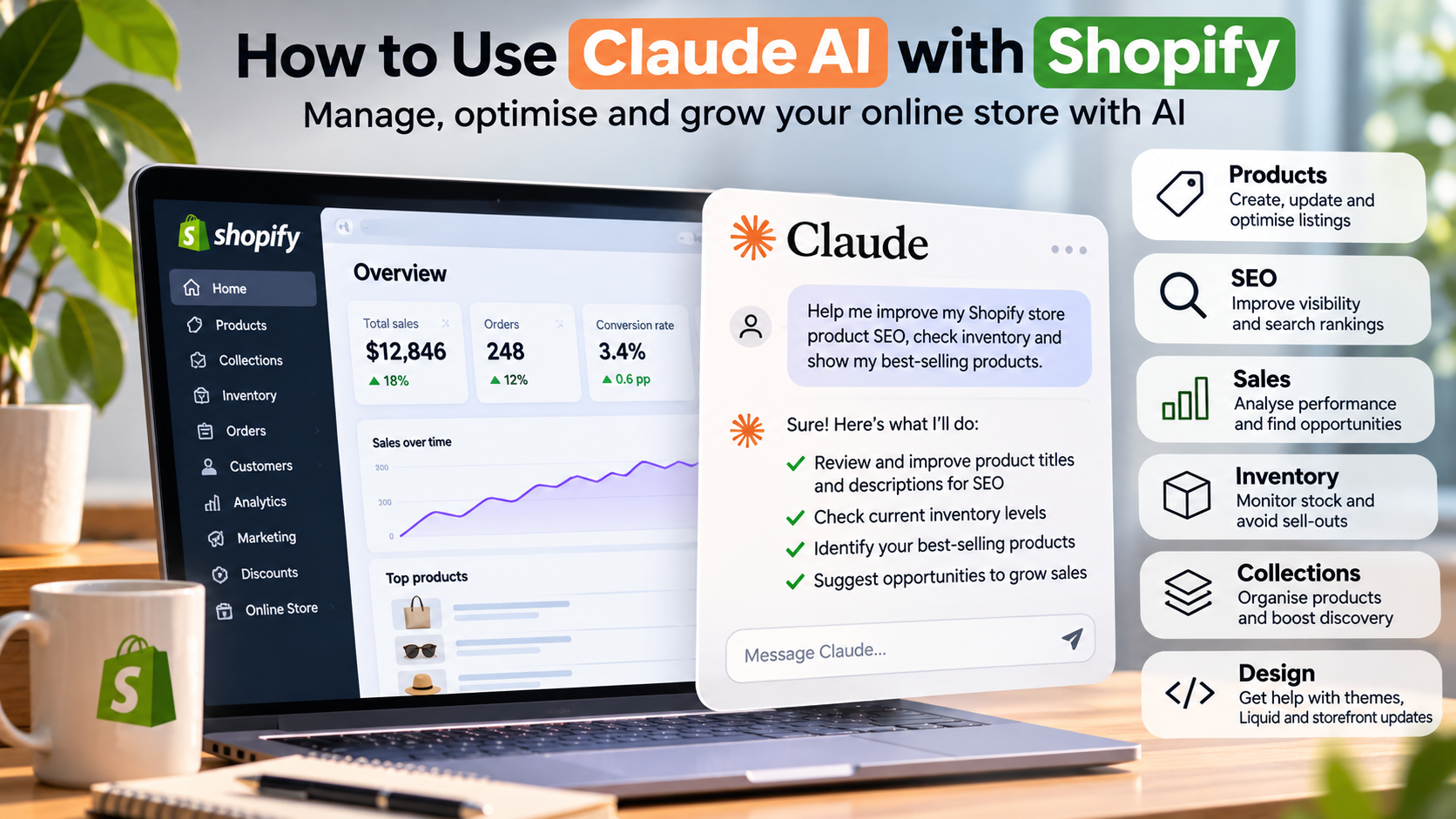
Running a Shopify store involves much more than uploading products and processing orders. Store owners need to maintain product information, manage inventory, improve search engine visibility, review sales performance and keep their websites up to date.
Artificial intelligence is making these everyday tasks easier.
Claude AI, developed by Anthropic, can now connect directly to Shopify, allowing business owners and developers to work with store information using everyday language.
Instead of navigating multiple sections of the Shopify admin, you can ask Claude to find products, analyse sales, create collections or help update your online store.
But how does the integration work, and what can it actually do for your business?
What Is Claude AI for Shopify?
Claude is an AI assistant designed to help people research, analyse information, write content and complete complex tasks.
With the official Shopify connector, Claude can communicate with an authorised Shopify store and work with information such as products, collections, inventory, customers, orders and sales analytics.
For example, a Shopify store owner could ask:
"Show me my best-selling products over the past 30 days."
Claude can retrieve relevant Shopify analytics and present the results in an easier-to-understand format.
You can also ask it to create products, update descriptions, organise collections or identify inventory that needs attention.
This makes Claude useful not only for writing content but also for managing everyday eCommerce operations.
How to Connect Claude AI to Shopify
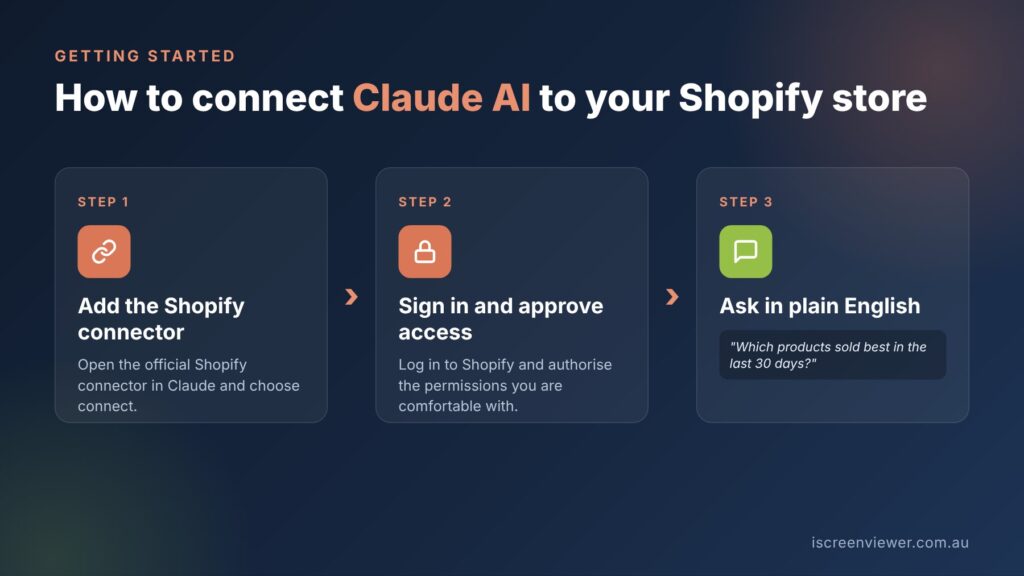
Shopify provides an official connector that lets you link your store to Claude securely.
To get started, visit the Shopify connector for Claude and follow the connection process.
You'll need to sign in to your Shopify account and authorise the permissions required for the tasks you want Claude to perform.
Once connected, you can ask Claude questions about your store or request supported changes.
For example:
"Connect to my Shopify store and show me the 20 products with the lowest available inventory."
The connector's capabilities depend on the permissions you approve. Some operations may be available only through the Shopify admin.
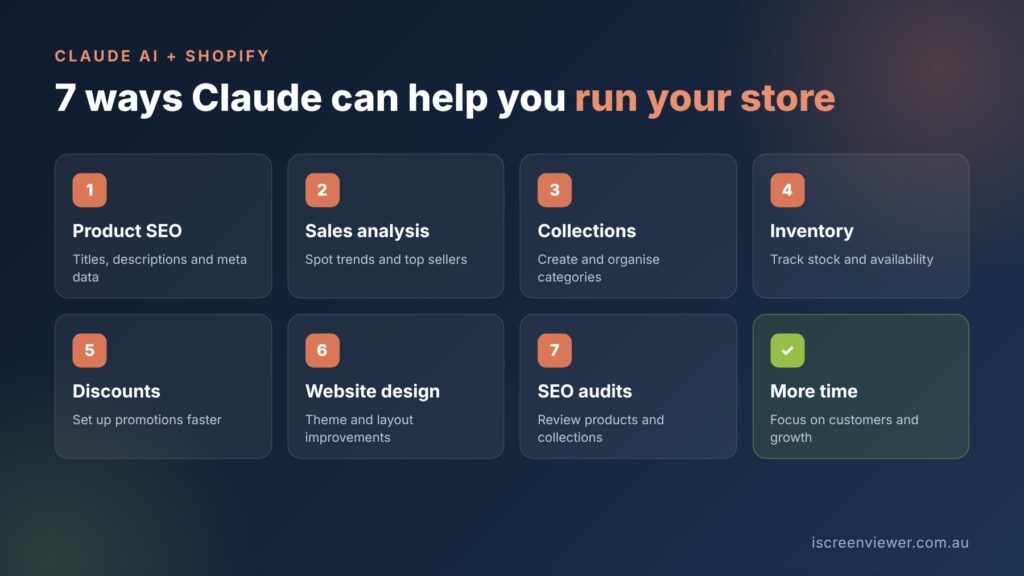
1. Improve Shopify Product Descriptions and SEO
Search engine optimisation is one of the most valuable areas where Claude can assist Shopify store owners.
A Shopify website may have hundreds or thousands of products, each requiring a unique title, description, image alt text and appropriate search terms.
Writing these manually can be time-consuming.
Claude can help review existing product information and prepare improved content based on product specifications and relevant search phrases.
For example:
"Review my Shopify product descriptions and identify opportunities to improve search engine visibility. Suggest unique product titles, descriptions and relevant keywords without changing product specifications."
A good product description should answer customer questions, explain the product's benefits and use natural search terms.
However, AI-generated content still needs human review. Product dimensions, materials, compatibility, prices and other factual information should always be verified before publishing.
2. Analyse Shopify Sales and Identify Opportunities
Understanding which products generate revenue is essential for growing an online store.
Shopify provides reporting tools, but interpreting performance across products and time periods can still require additional work.
Claude can help retrieve and explain information from Shopify analytics.
For example:
"Compare my total sales this month with last month and identify the products contributing most to revenue."
Store owners can use these insights to make more informed decisions about promotions, purchasing and product merchandising.
Claude may also help identify products with strong sales performance, declining demand or opportunities to create more targeted collections.
The quality of the analysis depends on the available Shopify data, so results should always be checked against the relevant reporting period.
3. Create and Manage Shopify Collections
Collections help customers navigate an online store and discover products that match their interests.
They are also important for Shopify SEO because dedicated collection pages can target specific product categories and search intent.
Claude can help create manual and automated collections, update descriptions and organise existing products.
For example:
"Create a Shopify collection for women's wedding guest dresses using products that match the category. Draft a unique SEO-focused description and show me the proposed products before publishing."
For larger catalogues, automated collections can help reduce ongoing maintenance by grouping products according to defined rules.
A well-structured collection should have a descriptive heading, relevant product selection, useful content and internal links to related categories.
4. Monitor Inventory and Product Availability
Inventory management becomes more challenging as a Shopify store grows.
Products may have multiple sizes, colours, variants and stock locations.
The Shopify connector allows Claude to retrieve available inventory information and, with appropriate permissions, update stock quantities.
You could ask:
"Find products with fewer than five units available and group them by product type."
This can help identify low-stock products before they affect customer orders.
Inventory changes should be reviewed carefully, particularly when Shopify is connected to a warehouse, point-of-sale system or another inventory platform.
5. Manage Shopify Discounts and Promotions
Discounts are a common way for Shopify businesses to encourage purchases and promote seasonal products.
Claude's Shopify connector supports creating percentage-based discount codes with specified conditions.
For example:
"Create a 10% discount code for the Summer Accessories collection, subject to my approval."
Shopify store owners can use AI to plan promotions, review product performance and prepare supporting campaign content.
However, discount profitability, eligibility and promotional conditions still require careful review.
6. Improve Your Shopify Website Design
Claude can also assist with Shopify storefront development.
For developers working with Shopify Liquid, CSS, JavaScript and theme sections, AI can help plan improvements and generate code.
Potential tasks include improving mobile navigation, refining product page layouts, developing reusable sections and addressing accessibility issues.
With the official connector, storefront design changes can be made to an unpublished theme for review before they reach customers.
For example:
"Review my unpublished Shopify theme and suggest improvements to the mobile product page layout. Preserve all existing purchasing functionality."
Changes should be tested across mobile and desktop devices, including add-to-cart, checkout navigation and any installed app functionality.
AI can accelerate development, but it does not eliminate the need for quality assurance.
7. Use Claude AI for Shopify SEO Audits
Beyond individual products, Claude can help organise an ongoing Shopify SEO workflow.
An effective audit should examine product and collection titles, duplicate content, heading structure, image alt text, internal links, indexability and technical performance.
Claude can assist with reviewing exported information and preparing recommendations.
When combined with verified Google Search Console and Google Analytics data, it can also help investigate which pages are attracting visitors and which may need improvement.
For example:
"Compare my Shopify landing pages with available Google Search Console data and identify pages that receive impressions but have low click-through rates."
This type of analysis requires access to the relevant data sources. Connecting Shopify alone does not automatically provide Google Search Console information.
Is Claude AI Safe to Use With Shopify?
The official Shopify connector uses an authorisation process that lets store owners approve access to their data.
The level of access granted determines which information Claude can read or change.
For business-critical operations, it's sensible to begin with limited permissions and review requested changes before applying them.
Keep backups of your theme, test design changes in an unpublished copy and avoid making large catalogue updates without checking a smaller sample first.
AI should be treated as a tool that supports your business processes, rather than a replacement for store management and technical oversight.
Can Claude Replace a Shopify Developer?
Claude can help automate repetitive tasks, generate content, analyse information and accelerate technical work.
However, a successful Shopify store still depends on good planning, product accuracy, reliable integrations, customer experience and ongoing maintenance.
Complex theme customisation, third-party integrations, checkout issues, SEO strategy and troubleshooting can still benefit from an experienced Shopify developer.
The most effective approach is to combine AI tools with professional development practices.
This helps businesses work faster without compromising website functionality or customer experience.
Read more: What is OpenAI Codex and how to use it for website development.
Frequently Asked Questions About Claude AI and Shopify
Can Claude AI connect directly to my Shopify store?
Yes. Shopify provides an official connector for Claude. You sign in to your Shopify account and approve the permissions, and Claude can then read store data and make supported changes.
What can Claude AI do for a Shopify store?
Claude can help write product descriptions and SEO metadata, analyse sales, create and update collections, check inventory, set up discounts and review your store for SEO issues.
Is it safe to give Claude access to my Shopify store?
Access is controlled by the permissions you approve during connection. Start with the access you need, review changes before they go live and keep important actions, such as bulk price changes, under human review.
Can Claude replace a Shopify developer?
No. Claude is useful for content, analysis and routine admin tasks, but theme development, custom features, app integrations and troubleshooting still need a developer.
Does Claude AI help with Shopify SEO?
Yes. Claude can draft SEO titles, meta descriptions, alt text and collection copy, and highlight missing or duplicate metadata. You should still check the keyphrases and facts before publishing.
Final Thoughts: Is Claude AI Worth Using for Shopify?
For many Shopify store owners, Claude offers a practical way to reduce repetitive administrative work.
Its official Shopify integration makes it possible to work with products, collections, inventory and sales information through conversational instructions.
It can also support SEO content development, reporting and technical improvements.
The biggest advantage is not simply generating content faster. It is having more time to focus on improving the customer experience, developing products and growing your business.
Related Articles
Want to learn more about AI and eCommerce? Read these articles next:
- How ChatGPT is being used in businesses
- Run an online store with Vendr and Umbraco
- How to Get Your Business Found in AI Search: Keyword Planning, Schema and AI Visibility
- What Is OpenAI Codex? How to Use It for Website Development in 2026
- How to Write Product Listings That Rank on Google (Shopify and WooCommerce)
Need Help With Shopify Development, SEO or AI Integration?
At iScreenviewer, I work directly with Australian businesses to build, improve and maintain eCommerce websites.
Whether you need a new Shopify store, theme customisation, better product SEO, analytics support or assistance using AI tools, I can help you develop a practical solution for your business.
Explore my website development and eCommerce services or get in touch to discuss your Shopify project.
Fixed-Price Packages That Can Help

Prefer to have it done for you? These fixed-price packages cover the work in this guide, with no hourly billing:
- Keyword Planning, Schema Markup and AI Search Visibility: A$599
- Shopify Quick Fix: A$199
- Product Listing and SEO Batch: A$200
Not sure which one you need? Book a free website consultation or request a custom quote.