

Your Shopify website might still be processing orders, but is it providing the shopping experience your customers expect?
Online shopping has changed significantly over the past few years. Customers increasingly expect fast-loading pages, simple mobile navigation, clear product information and a straightforward checkout experience.
If your Shopify store was built several years ago and hasn't received significant improvements, there may be opportunities to modernise its design, improve search engine visibility and make it easier for customers to purchase your products.
However, an older website does not automatically need replacing. Some Shopify stores only require targeted improvements, while others benefit from a more comprehensive redesign.
In this guide, we'll explore 12 signs your Shopify website may need a redesign, how to assess your existing store and what Australian businesses should consider before upgrading.
1. Your Shopify Store Uses an Outdated Theme
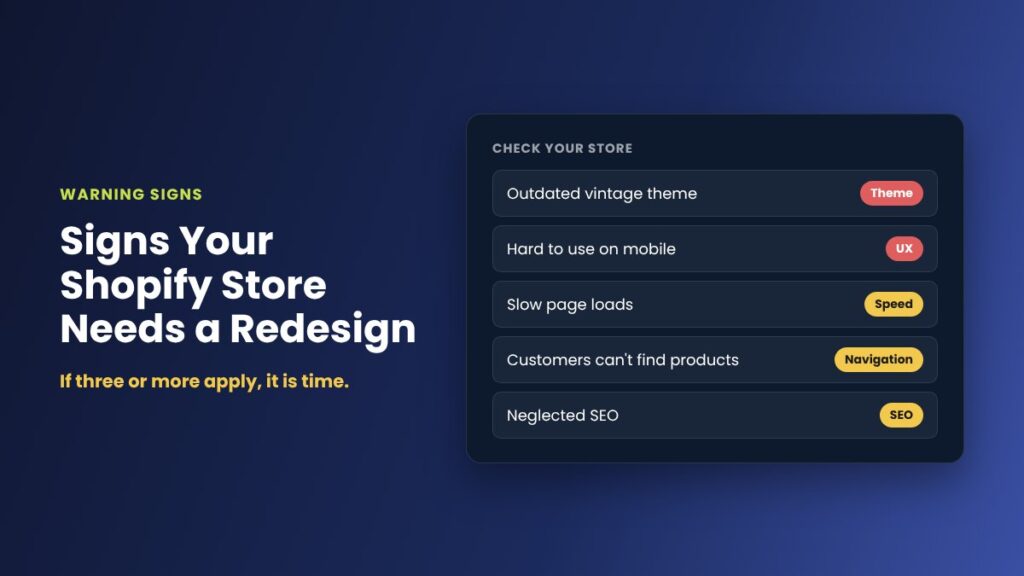
One of the first things to investigate is your Shopify theme.
Shopify has evolved beyond its original theme architecture. Modern themes support flexible page sections, app blocks, dynamic content and additional customisation options.
Some older stores still use vintage Shopify themes that were built before Online Store 2.0.
Shopify's free vintage themes no longer receive regular feature updates, although security fixes may still be provided.
This doesn't necessarily mean your store is broken. However, maintaining an older theme can make new features and design improvements more difficult to implement.
What to check:
Open your Shopify admin and navigate to Online Store > Themes. Review your current theme, its architecture version and whether an update is available.
If your theme is heavily customised, assess whether updating it would be more practical than migrating to a newer design.
A modern Online Store 2.0 theme or theme-block architecture may offer greater flexibility and reduce the need for custom code.
2. Your Website Is Difficult to Use on Mobile Devices
A Shopify store might look attractive on a desktop computer but provide a frustrating mobile experience.
Common problems include small navigation links, oversized banners, overlapping content, difficult product filters and buttons positioned too close together.
Mobile usability is also important for search visibility.
Google uses the mobile version of website content for indexing and ranking, making a mobile-friendly design an important part of technical SEO.
What to improve:
Review your homepage, product pages, collections and cart on a real mobile device.
Make sure customers can easily search for products, select variants, read product descriptions and complete purchases without unnecessary steps.
A responsive design should adapt naturally to different screen sizes rather than simply shrinking the desktop layout.
3. Your Shopify Website Loads Slowly
Website performance affects how visitors experience your store.
A slow homepage, delayed product image or unresponsive add-to-cart button can make shopping more frustrating.
Slow performance may result from oversized images, unnecessary JavaScript, third-party apps, custom theme code or other technical issues.
Google's Core Web Vitals can help identify performance problems.
These include:
- Largest Contentful Paint (LCP): How quickly the main visible content loads.
- Interaction to Next Paint (INP): How responsive the page feels when visitors interact with it.
- Cumulative Layout Shift (CLS): How much visible content moves unexpectedly while the page loads.
You can check individual pages using Google PageSpeed Insights.
What to improve:
Start by identifying the largest performance problems rather than immediately installing optimisation apps.
Review image sizes, unused apps, scripts, fonts and custom code. Improvements should be tested carefully to avoid affecting existing store functionality.
Not every slow Shopify website requires a new theme, but performance problems can be a strong reason to review its design and development.
4. Customers Struggle to Find Products
Clear website navigation is essential for an online store.
If customers cannot quickly find the products they're looking for, they may leave without making a purchase.
An outdated navigation structure might include too many menu items, confusing category names, unnecessary clicks or poorly organised product collections.
For businesses with larger catalogues, effective filtering and search functionality can make a significant difference.
What to improve:
Review your main menu, collection hierarchy and site search.
Organise products into meaningful categories and use customer-friendly labels.
Where appropriate, introduce filters for relevant attributes such as size, colour, availability, price or product type.
The goal is to help customers find suitable products without needing to understand how your inventory is organised internally.
5. Your Product Pages Don't Answer Customer Questions
Product pages are among the most important parts of a Shopify website.
A product page should give visitors enough information to understand the product and make a confident purchasing decision.
Common problems include limited descriptions, low-quality images, hidden shipping information, unclear variant selectors and confusing availability messages.
What to improve:
Review whether your product pages clearly communicate:
- Product features, benefits and specifications.
- Sizes, dimensions, materials or compatibility.
- Product availability and variant options.
- Delivery, returns and warranty information.
- Clear pricing and a visible add-to-cart button.
Australian stores should also ensure that GST-related pricing and delivery information are displayed clearly and accurately.
Depending on the products you sell, additional photography, product videos, FAQs or customer reviews may also be useful.
6. Your Branding Looks Inconsistent or Dated
Your Shopify website represents your business.
If your store uses inconsistent fonts, mismatched colours, old promotional banners or outdated imagery, it may not reflect the quality of your products or services.
A redesign can help create a more consistent experience across the homepage, collection pages, product listings and checkout-related branding.
What to improve:
Establish a clear visual style with consistent typography, colours, spacing and imagery.
Ensure promotional elements support the shopping experience instead of overwhelming it.
The aim isn't necessarily to follow every design trend. A good eCommerce design should be recognisable, accessible and easy to use.
7. Your Collection Pages Are Missing Important Features
Shopify collections help customers browse related products.
They also provide opportunities to target relevant product-category searches on Google.
For example, a fashion store might benefit from dedicated collections for occasion dresses, wedding outfits, formal clothing or seasonal products.
An older collection page may simply display a grid of products without useful descriptions, filtering or internal links.
What to improve:
Review your collection structure and identify categories that match real customer searches.
Each important collection should contain appropriate products, a descriptive heading, useful introductory content and relevant internal links.
Avoid creating large numbers of nearly identical collections purely to target keyword variations.
Effective collection pages should serve a genuine shopping need while making products easier to discover.
8. Your Store Search and Product Filters Need Improvement
Customers who know what they want often use a website's search function.
If search results are inaccurate, incomplete or difficult to navigate, customers may struggle to find suitable products.
Older themes and customised search implementations may not support the product discovery experience you want to provide.
What to improve:
Test searches using product names, categories, common abbreviations and relevant descriptive terms.
Check whether your store supports predictive search, appropriate filters and useful empty-search results.
Where required, assess Shopify's native search functionality or compatible third-party search solutions.
A redesign is also an opportunity to simplify filters and remove unnecessary options.
9. Your Shopify SEO Has Been Neglected
A Shopify store can look modern while still having technical or content-related SEO problems.
Search engines need to understand your website's pages, products and structure.
Common issues worth reviewing include duplicate or unclear page titles, missing product descriptions, poorly organised collections, broken internal links and incorrect redirects.
Image alt text, structured product data and descriptive headings can also help improve how search engines understand your content.
What to improve:
Conduct a Shopify SEO audit before making major changes.
Check your important product and collection pages, metadata, internal linking and search indexing.
Use Google Search Console to identify pages receiving impressions, clicks and organic search traffic.
If you redesign your store, preserve valuable URLs wherever possible and create permanent redirects when URLs need to change.
A website redesign does not automatically improve Google rankings. Technical SEO and content improvements need to be planned and implemented properly.
10. You Don't Know Which Pages Generate Sales
Website design decisions are more effective when supported by reliable data.
If your store doesn't have suitable analytics configured, it may be difficult to understand where visitors come from, which products receive attention and how customers move through your store.
Shopify provides built-in analytics and reporting, while Google Analytics 4 and Google Search Console offer additional insights.
What to improve:
Review your analytics setup and confirm that important events are being recorded correctly.
Pay particular attention to product views, add-to-cart activity, checkout behaviour and completed purchases.
Use this information to identify pages that may need improvement.
For example, a collection page receiving organic search traffic but generating few product views could warrant a review of its layout, product selection and filtering.
Analytics doesn't tell you everything about customer behaviour, but it can help you prioritise changes based on evidence.
11. Making Simple Website Updates Has Become Difficult
Shopify is designed to let businesses manage products and website content without needing a developer for every change.
However, some heavily customised themes make everyday updates unnecessarily complicated.
You might need to edit code to change a homepage section, contact a developer to update banners or work around app compatibility issues.
These challenges can increase website maintenance costs over time.
What to improve:
Review how your theme uses sections, templates, metafields and reusable components.
Modern Shopify theme architecture can allow more content to be managed directly through the theme editor.
A well-planned redesign can make future updates simpler for store owners and staff while retaining the custom functionality the business actually needs.
12. Your Website No Longer Supports Your Business Goals
Your business may have changed significantly since your Shopify store was first launched.
You might now offer more products, serve different customers, sell internationally or rely on new marketing channels.
Your original website design may no longer support those goals.
For example, a store that began with 20 products might now have hundreds of items requiring better collections, search and navigation.
What to improve:
Review what you want your website to achieve over the next 12 to 24 months.
Identify the most important business requirements, including product discovery, content management, marketing integrations, reporting and customer experience.
Your Shopify website should be able to support future growth without requiring a complete rebuild for every new initiative.
Should You Update Your Existing Shopify Theme or Redesign the Entire Store?
Not every Shopify store needs a complete rebuild.
Sometimes the best approach is to improve the existing website through targeted design changes, performance optimisation and SEO updates.
When a Smaller Update May Be Enough
Your existing store may only need improvements if its theme is well supported, the mobile experience works properly and its technical foundations are reliable.
Potential improvements include updating banners, refining product pages, improving navigation, optimising images and correcting SEO issues.
When a Full Redesign Makes More Sense
A larger redesign may be worth considering when several important problems occur together.
Examples include an unsupported theme architecture, difficult content management, substantial mobile usability problems and custom code that is increasingly expensive to maintain.
In these situations, rebuilding the storefront using a modern Shopify theme may provide a better long-term solution than repeatedly modifying an ageing implementation.
The right decision depends on your requirements, budget and the condition of your existing website.
How to Redesign a Shopify Website Without Losing SEO Rankings
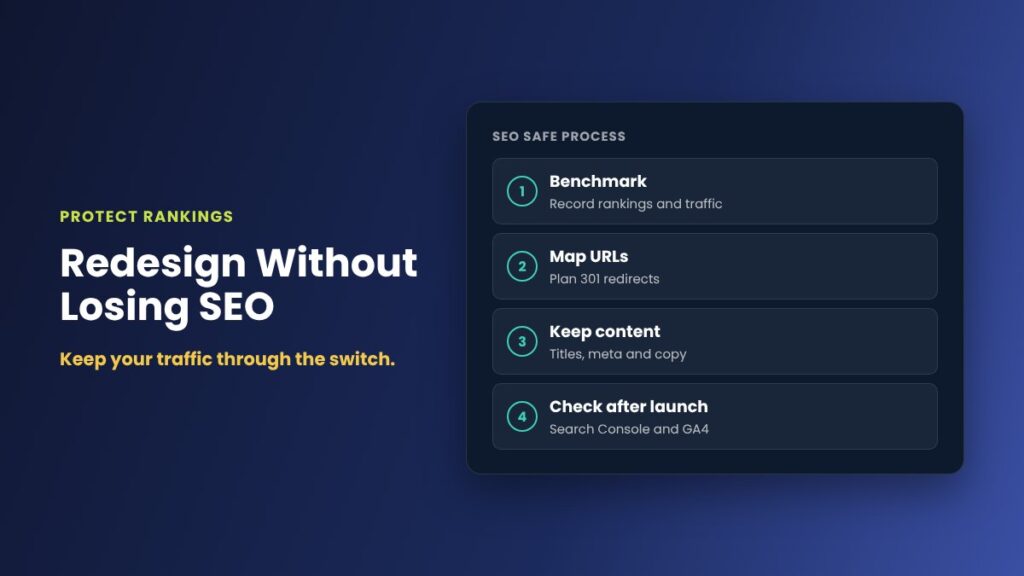
A Shopify redesign should involve more than choosing a new theme and replacing images.
Existing search rankings, product URLs, content and store functionality need careful consideration.
A structured redesign process should include the following stages.
Stage 1: Audit the Existing Store
Review your current Shopify theme, website performance, product pages, collection structure, analytics and SEO.
Identify what is working well and what needs improvement.
Use this audit to establish the scope of the redesign.
Stage 2: Plan the New Website Structure
Define the navigation, homepage content, important collections and product templates.
Review existing URLs and identify any planned changes.
Consider the website's desktop and mobile layouts before beginning development.
Stage 3: Build and Test an Unpublished Theme
Shopify allows development work to be completed using an unpublished theme.
This makes it possible to preview and test design changes while keeping the live storefront operating.
Test important functions, including product variants, add-to-cart behaviour, navigation, payment integrations and third-party apps.
Stage 4: Protect Existing SEO
Preserve important URLs where possible.
If URLs change, create appropriate redirects and update internal links.
Check page titles, headings, meta descriptions, canonical tags, structured data and crawlability.
Search visibility should be monitored after launch using Google Search Console.
Stage 5: Launch and Monitor Performance
After testing, publish the approved theme.
Monitor the website for technical errors and unexpected changes in traffic or conversion performance.
Review customer feedback and continue improving the experience over time.
A successful redesign is an ongoing improvement process rather than simply a visual refresh.
How Much Does a Shopify Website Redesign Cost in Australia?
Shopify redesign costs vary considerably depending on the size of the store and the work required.
A relatively simple theme refresh may involve updating the layout, fonts, colours and existing page sections.
A more complex project could include custom Shopify Liquid development, redesigned product templates, new collection structures, third-party integrations, SEO migration and extensive testing.
Factors affecting cost include:
- The number and complexity of product templates.
- Whether you're using an existing or custom theme.
- The amount of custom functionality required.
- Product catalogue size and structure.
- Existing app integrations.
- SEO migration and analytics requirements.
- Testing, training and ongoing support.
For an accurate estimate, it's worth having your existing store reviewed before committing to a full redesign.
This helps identify where you can retain useful functionality and where improvements are genuinely needed.
Frequently Asked Questions About Shopify Website Redesigns
How often should I redesign my Shopify website?
There is no fixed schedule. Review your store regularly, particularly when your theme becomes difficult to maintain, the customer experience falls behind expectations or your business requirements change. A well-maintained store can remain effective for years.
Will a new Shopify theme improve my SEO?
Not automatically. A modern theme may provide opportunities to improve performance, usability and technical structure, but rankings also depend on content quality, relevance, indexing and other factors. Poorly managed redesigns can negatively affect SEO.
Can I redesign Shopify without losing my products?
Yes. Changing your Shopify theme does not inherently delete products, collections or orders. However, theme-specific settings, templates and customisations may need to be recreated or migrated. Always back up important data and test before launch.
Can I redesign my Shopify store while it's live?
Yes. You can work on an unpublished theme while customers continue using the live store. Once the new design has been tested and approved, you can publish it.
Do I need a Shopify developer to redesign my store?
Not necessarily. Smaller updates may be handled using Shopify's theme editor. More complicated projects involving custom Liquid, JavaScript, app integrations or technical SEO can benefit from an experienced developer.
Final Thoughts: Is It Time to Upgrade Your Shopify Store?
An outdated Shopify website doesn't always need to be replaced, but it should be reviewed if its design, performance or functionality is holding your business back.
Modernising your store can create opportunities to improve product discovery, simplify website management and provide a better shopping experience.
The most effective improvements begin with understanding your current website and identifying which changes will provide the greatest value.
Whether you need a small theme update or a complete redesign, planning the work carefully can help protect your existing store while preparing it for future growth.
Need Help Redesigning Your Shopify Website?
At iScreenviewer, I work directly with Australian businesses to design, develop and improve eCommerce websites.
From Shopify theme upgrades and custom development to SEO, analytics, website performance and ongoing support, I can help identify practical improvements for your online store.
You deal directly with the developer working on your project, with clear communication throughout the process.
Whether you're experiencing problems with an older Shopify theme or considering a complete storefront redesign, we can start by reviewing your existing website and discussing your goals.
Explore my Shopify and eCommerce development services
Contact iScreenviewer to discuss your website redesign
You can also read my guide on using Claude AI with Shopify to manage and grow your online store.
Fixed-Price Packages That Can Help

Prefer to have it done for you? These fixed-price packages cover the work in this guide, with no hourly billing:
- Full Rebuild Shopify Website: A$1,500
- Custom Shopify or WordPress Theme: A$3,000
- Website Re-skin: Design Refresh: A$990
Not sure which one you need? Book a free website consultation or request a custom quote.
Related Articles
- How Much Does a Website Redesign Cost in Australia in 2026?
- UX/UI Design for Small Business Websites: Wireframes, Prototypes and User Journeys
- Shopify SEO Checklist for Australian Online Stores in 2026
- Shopify vs WooCommerce: Which Is Better for Australian Small Businesses in 2026?
- Shopify 2.0 Features: What Matters for Your Online Store