

Having a Shopify website doesn't automatically mean customers will find your products on Google.
You might have a professionally designed online store, competitive prices and excellent products, but without proper search engine optimisation (SEO), potential customers could be finding your competitors instead.
For Australian Shopify businesses, SEO is an important way to attract customers who are actively searching for products to purchase.
Whether you sell clothing, furniture, automotive accessories, beauty products or homewares, improving your Shopify SEO can help increase organic search visibility and attract more relevant visitors.
The good news is that Shopify includes several SEO features that make optimisation easier. However, getting the most from those features still requires careful planning, product content improvements and ongoing technical maintenance.
This Shopify SEO checklist for 2026 covers 16 practical areas that Australian online store owners can review to improve search visibility, product discovery and the overall shopping experience.
Why Is Shopify SEO Important for Australian Businesses?
When someone searches Google for a product, they're often already considering a purchase.
For example, an Australian customer might search for:
- Women's wedding guest dresses Australia
- Motorcycle crash bars Australia
- Modern outdoor furniture Sydney
- Handmade women's headbands
- Commercial LED lighting Australia
- Kids formal suits online
These searches can represent valuable opportunities for online retailers.
Unlike paid advertising, where traffic generally depends on continuing advertising expenditure, organic search can provide ongoing visitors to well-optimised product and collection pages.
However, SEO isn't simply about adding keywords to a website.
Google also needs to understand your products, navigate your website, evaluate its content and determine which pages are most relevant to individual searches.
A successful Shopify SEO strategy combines keyword research, useful content, technical improvements and a clear website structure.
1. Research Keywords Your Australian Customers Actually Use
Before changing product descriptions or page titles, understand how potential customers search for the products you sell.
Keyword research helps identify the language customers use and which pages should target particular searches.
For example, a store selling children's formalwear might discover search opportunities around:
- Boys wedding suits
- Baby boy formal suits
- Girls birthday dresses
- First Holy Communion dresses
- Kids formalwear Australia
Instead of trying to rank every page for broad phrases such as "kids clothing", create relevant product collections targeting more specific customer needs.
How to improve your Shopify keyword research
- Start with your main product categories.
- Identify the words customers use when searching for those products.
- Review Google Search Console for searches already generating impressions.
- Compare relevant competitors and their collection structure.
- Use keyword tools to assess demand and competition.
- Assign a primary search topic to each important page.
For Australian businesses, consider whether search phrases naturally include words such as "Australia", "Sydney", "online" or "delivery".
Don't add location terms to every page simply because you operate in Australia. Use them when they match genuine search intent and the products or services you offer.
2. Optimise Shopify Product Titles and SEO Titles
Your product titles help customers and search engines understand what you're selling.
A common mistake is using product names that make sense internally but don't describe the product clearly.
For example:
Poor product title: Blue Rose Garden
Improved product title: Blue Rose Floral Headband for Women
The improved title explains the product type, design and intended audience.
Your product's visible title and its search engine listing title can also be different.
For example:
Product H1: Blue Rose Floral Headband for Women
SEO title: Blue Rose Floral Headband for Women | Nancy Niepess Fashion
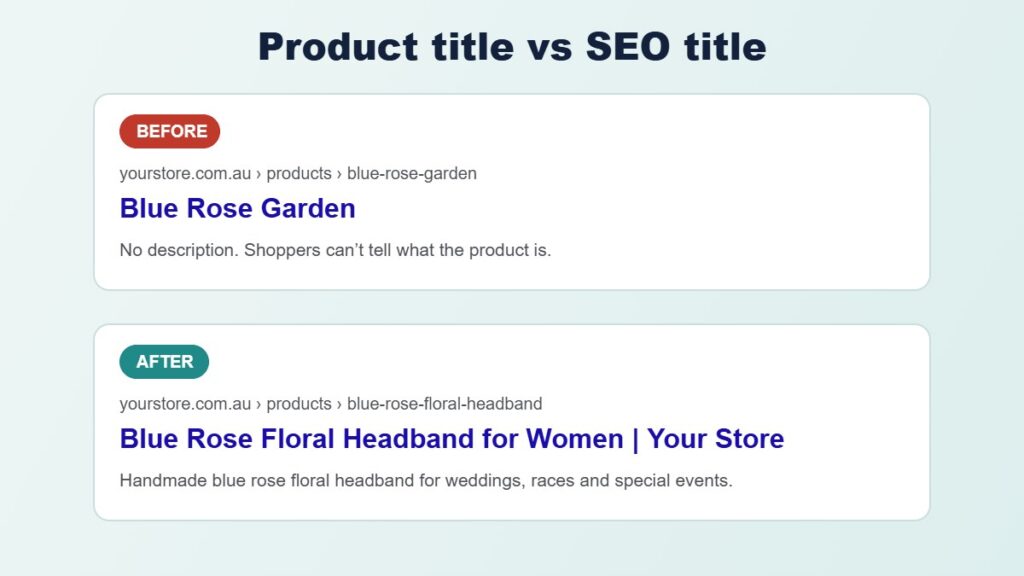
This allows your product page to display a natural heading while using a more descriptive search result title.
How to edit Shopify SEO titles
- Open Shopify Admin.
- Go to Products.
- Select the product you want to optimise.
- Find the Search engine listing section.
- Click the edit control.
- Update the page title and meta description.
- Save your changes.
As a practical starting point, aim for concise, descriptive SEO titles of approximately 50 to 60 characters where possible.
Google doesn't use a fixed character limit for displaying titles, so clarity is more important than meeting an exact number.
3. Write Unique, Helpful Shopify Product Descriptions
Product descriptions are among the most important content areas to optimise.
Many Shopify stores use short descriptions or copy supplied directly by manufacturers.
When multiple retailers publish identical product information, it becomes harder to differentiate their pages.
Your product descriptions should explain what makes each item useful and answer questions customers might have before purchasing.
A good description can include:
- The product's main features and benefits.
- Materials, dimensions, colours and specifications.
- Who the product is suitable for.
- How or where it can be used.
- Relevant care and maintenance information.
- Compatibility and installation details where applicable.
For example, an automotive accessories store could explain which motorcycle models a crash bar fits, its material, included mounting hardware and installation requirements.
This is more useful than repeating the manufacturer's product name several times.
Shopify product description SEO tips
Use the primary keyword naturally in the opening paragraph where appropriate.
Include informative subheadings for longer descriptions, such as Product Features, Specifications, Compatibility and Frequently Asked Questions.
Avoid keyword stuffing and generic AI-generated descriptions that repeat the same information across hundreds of products.
The goal is to make every important product page more helpful to customers.
4. Create SEO-Optimised Shopify Collection Pages
Collection pages are one of the biggest SEO opportunities for many Shopify businesses.
While individual product pages usually target specific items, collections can target broader shopping categories.
For example, a clothing retailer may benefit from dedicated collections for:
- Women's formal dresses
- Girls birthday dresses
- Baby boy suits
- Christening dresses
- Boys wedding outfits
Each collection should serve a distinct customer need.
What makes a strong Shopify collection page?
An effective collection should include a descriptive H1 heading, a carefully selected product range, useful introductory content and intuitive filters.
Where appropriate, add internal links to closely related collections.
For example, a Girls Birthday Dresses collection could link to Girls Party Dresses or Girls Special Occasion Outfits.
The collection description should explain the products available and help shoppers choose suitable items.
A practical starting point might be 150 to 300 words for a major collection, but there is no required word count for Google rankings.
Prioritise useful, relevant information over writing a particular number of words.
Important: Don't create numerous collections containing almost identical products and descriptions just to target small keyword variations.
Too many overlapping pages can make your website harder to manage and confuse customers about which collection to visit.
5. Add Descriptive Alt Text to Shopify Product Images
Product images are essential for eCommerce websites.
They help customers understand your products and can also provide additional context to search engines.
Image alt text describes the visual content of an image, primarily for accessibility.
For example:
Poor alt text: IMG_2026_001
Improved alt text: Royal blue floral headband with rose garland and green leaves for women
The improved description explains what the image actually shows.
Shopify image SEO checklist
- Use clear, high-quality product photography.
- Write descriptive alt text for meaningful product images.
- Use relevant filenames when uploading new images.
- Include useful product details such as colour, material or style where visible.
- Avoid repeating the same keyword-heavy description on every image.
- Use appropriate image formats and sizes.
For products with multiple photographs, describe the distinguishing details of each image.
For example, the front view, side view and close-up of a product may require different alt text.
Images that are purely decorative can use empty alt text where appropriate.
6. Improve Your Shopify Website Navigation
A clear navigation structure benefits both customers and search engines.
Google discovers pages partly by following links between the pages of your website.
If important collections or products are difficult to reach, they may receive less attention from customers and search engine crawlers.
For example, an online fashion store might organise its navigation like this:
Home > Girls Clothing > Special Occasion Dresses > Birthday Dresses
Customers should be able to understand where products belong without navigating through multiple confusing menus.
Navigation improvements to consider
Keep your main menu focused on important product categories.
Use understandable labels rather than internal product terminology.
Create logical relationships between broad collections and more specific categories.
Link to popular products and collections from your homepage when appropriate.
Make sure products you want indexed are accessible through normal website links rather than relying entirely on internal search results.
A good navigation structure can improve product discovery and create a stronger foundation for SEO.
7. Improve Shopify Internal Linking
Internal links connect related pages on your website.
They help search engines discover content and give customers useful pathways to explore more products.
For example, a blog article about choosing a wedding outfit could link to relevant suit and dress collections.
A collection page could also link to complementary product categories.
Useful internal linking opportunities include:
- Homepage to important collections.
- Collections to related collections.
- Blog articles to relevant products.
- Product pages to compatible accessories.
- Buying guides to appropriate product categories.
Use descriptive link text that explains the destination.
For example, "Browse our boys wedding suits" is more helpful than "Click here".
Avoid adding dozens of unrelated links solely for SEO.
Each link should make sense for the customer reading the page.
8. Check Your Shopify Sitemap and Google Indexing
Shopify automatically generates a sitemap that helps search engines discover your website's important pages.
For most stores, it can be found at:
https://yourstore.com.au/sitemap.xml
The sitemap normally includes links to products, collections, pages and blog articles.
You don't usually need a separate app to generate a basic Shopify sitemap.
How to submit your Shopify sitemap
- Open Google Search Console.
- Select your verified Shopify domain property.
- Go to Indexing > Sitemaps.
- Enter
sitemap.xml. - Click Submit.
Submitting a sitemap helps Google discover your pages, but it doesn't guarantee that every URL will be indexed.
Check for indexing problems
Use Google Search Console to investigate important pages that aren't appearing in search results.
Look for issues involving redirects, canonical URLs, noindex directives, crawling errors or duplicate content.
Also confirm that your store isn't password-protected when you expect it to be publicly indexed.
If Google excludes an unimportant page, that isn't necessarily a problem.
Focus on ensuring that valuable products, collections and content pages are accessible and eligible for indexing.
9. Fix Broken Links and Shopify URL Redirects
Broken links can frustrate shoppers and prevent visitors from reaching the products they want.
They can occur when products are deleted, collections are renamed or website URLs change.
For example, you might change:
/collections/girls-party-clothes
To:
/collections/girls-party-dresses
If the original URL receives traffic or has existing backlinks, customers and search engines should be directed to the appropriate new page.
How to create Shopify URL redirects
- Open Shopify Admin.
- Go to Content > Menus.
- Open URL redirects.
- Click Create URL redirect.
- Enter the old path.
- Enter the new destination path.
- Save the redirect.
Shopify supports permanent URL redirects for supported URL paths that no longer serve valid pages.
Always test redirects after implementation.
For discontinued products, redirect visitors to a genuinely relevant replacement when one exists.
Avoid automatically redirecting every deleted product to the homepage, as this may provide a poor experience for visitors.
10. Improve Your Shopify Website Loading Speed
Website performance can influence how customers interact with your online store.
Large images, unnecessary apps, excessive JavaScript and poorly maintained themes can all contribute to slower pages.
Google uses Core Web Vitals to assess important aspects of page experience.
These include:
- Largest Contentful Paint (LCP): Measures how quickly the main visible content loads.
- Interaction to Next Paint (INP): Measures responsiveness to user interactions.
- Cumulative Layout Shift (CLS): Measures unexpected layout movement.
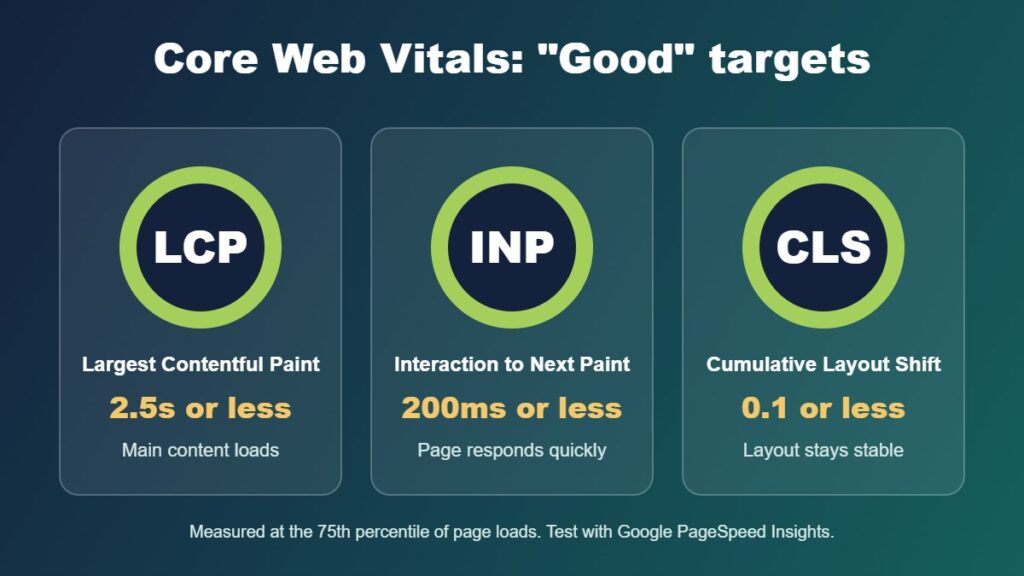
You can test pages using Google PageSpeed Insights.
Shopify speed optimisation tips
- Compress unnecessarily large images.
- Use appropriately sized images for mobile and desktop.
- Remove unused apps and related code where safe.
- Review third-party tracking and marketing scripts.
- Avoid loading unnecessary fonts and animation libraries.
- Use lazy loading for suitable below-the-fold images.
- Test custom JavaScript and theme modifications.
Check performance on your homepage, important collections and product pages rather than testing only one URL.
A faster website is valuable for customers, but performance improvements alone don't guarantee higher Google rankings.
11. Add and Validate Shopify Product Structured Data
Structured data helps search engines understand the information displayed on a webpage.
For Shopify stores, Product structured data can describe information such as:
- Product name and description.
- Images.
- Price and currency.
- Availability.
- Brand and product identifiers.
- Shipping and return information, where supported.
- Eligible customer review information.
When implemented correctly, this information can help your product pages qualify for enhanced appearances in Google Search.
However, structured data doesn't guarantee a particular search feature or ranking position.
How to check Shopify product structured data
Open Google's Rich Results Test.
Enter the URL of an important Shopify product page and run the test.
Review the detected Product and Merchant listing markup.
Check whether the product's price, availability and other information match the visible webpage.
Many Shopify themes provide Product structured data automatically, so avoid adding duplicate schema through multiple apps or custom code.
If there are errors, investigate the existing implementation before installing another SEO app.
12. Connect Google Merchant Center and Review Product Data
Google Merchant Center helps online retailers provide product information to Google.
For Australian eCommerce businesses, it can support product visibility across eligible Google shopping experiences.
Shopify provides a Google & YouTube sales channel that can help connect store information with Google's services.
What to check in Google Merchant Center
Review whether your submitted products have accurate titles, descriptions, prices, availability and images.
Check that the correct currency is used, such as AUD for products offered to Australian shoppers.
Make sure shipping and return information is accurate and consistent with your website.
Review any product disapprovals, warnings or missing attributes.
Where applicable, include GTINs, brand names and other legitimate product identifiers.
A clean, accurate product feed can improve the quality of your Google product listings and reduce avoidable disapprovals.
13. Create Useful Shopify Blog Content
A Shopify blog can attract potential customers who are researching products before making a purchase.
Not every search begins with someone knowing which product they want.
For example, customers might search for:
- What to wear to a wedding in summer
- How to choose the right motorcycle crash bars
- Best materials for outdoor furniture
- How to choose a headband for race day
- How to measure children's formal clothing
These searches can provide opportunities to create useful articles that naturally introduce relevant products.
Shopify content marketing tips
Choose topics connected to the products you actually sell.
Answer questions customers regularly ask.
Use original product knowledge, useful photographs and accurate information.
Link to relevant collections or products where it genuinely helps readers.
Update existing articles when product ranges or recommendations change.
Avoid publishing large amounts of generic AI-written content without reviewing its accuracy and usefulness.
A smaller collection of helpful, well-maintained articles is often more valuable than hundreds of repetitive posts.
14. Set Up Google Search Console and Google Analytics 4
SEO improvements should be measured using reliable data.
Two important tools for Shopify businesses are Google Search Console and Google Analytics 4.
Google Search Console
Search Console provides information about how your website performs in Google Search.
You can review:
- Search queries generating impressions.
- Organic clicks and click-through rates.
- Average search positions.
- Landing pages receiving search traffic.
- Indexing and technical search issues.
For example, you might identify a collection page appearing frequently in Google Search but receiving relatively few clicks.
That could indicate an opportunity to improve its page title, description or relevance to the search query.
Google Analytics 4
GA4 provides additional information about visitor behaviour and website performance.
When properly configured, it can help you understand which landing pages attract visitors and how those visitors interact with your store.
For Shopify businesses, it's important to verify that relevant eCommerce events are recorded correctly.
These can include product views, add-to-cart actions, checkout activity and completed purchases.
Review your analytics configuration to avoid duplicate purchase events or unnecessary tracking scripts.
Use Search Console and GA4 together to understand both organic visibility and what happens after customers arrive.
15. Optimise for Australian Customers and International Markets
Australian Shopify stores should ensure their website information reflects the customers they serve.
This includes accurate currency, delivery information, product availability and relevant business details.
For a business primarily selling within Australia, review whether product pages clearly communicate:
- Prices in Australian dollars.
- Applicable GST information.
- Australian shipping and delivery options.
- Relevant return and refund information.
- Contact and customer support details.
- Product specifications using appropriate local terminology.
Businesses serving international customers may also need different currencies, languages or regional content.
Shopify Markets provides international SEO features that can help manage region-specific URLs, sitemaps and hreflang tags.
These features should be configured carefully to ensure customers and search engines reach the intended market-specific pages.
Don't create separate location-based pages for every Australian city unless the content provides genuinely distinct value to customers.
16. Prepare Your Shopify Products for AI Search
Search is continuing to evolve as AI-powered tools help people discover and compare products.
Customers may use AI assistants or AI-powered search features to ask detailed shopping questions.
For example:
"Find a suitable waterproof motorcycle luggage bag for touring in Australia."
To understand and recommend relevant products, these systems benefit from accurate and comprehensive product information.
How to improve product content for AI discovery
Use clear product titles that identify the item.
Include detailed specifications, dimensions, materials and compatibility details.
Answer common questions about product suitability.
Provide accurate pricing and availability information.
Use descriptive images and appropriate structured data.
Keep your product catalogue information consistent across Shopify and connected shopping platforms.
There is no separate technique that guarantees inclusion in AI-generated search results.
However, improving product information for customers, search engines and shopping platforms is a sensible long-term approach.
AI can also assist with some of your store management tasks.
Read my related article: How to Use Claude AI with Shopify to Manage and Grow Your Online Store.
Shopify SEO Checklist: Quick Summary
Use this checklist when reviewing your online store:
- Identify relevant Australian product search keywords.
- Optimise important product titles and SEO titles.
- Write unique, informative product descriptions.
- Create useful, well-organised Shopify collections.
- Add descriptive alt text to product images.
- Improve website menus and category navigation.
- Add relevant internal links between pages.
- Submit your sitemap to Google Search Console.
- Investigate important pages excluded from Google indexing.
- Fix broken links and implement appropriate redirects.
- Test homepage, collection and product page speed.
- Validate Product structured data.
- Review Google Merchant Center product information.
- Publish helpful articles relevant to your products.
- Verify GA4 eCommerce tracking and Search Console data.
- Keep Australian and international store information accurate.
Not every Shopify store will require extensive work in every area.
Start with the problems most likely to affect your important products, organic traffic and customer experience.
How Often Should You Review Your Shopify SEO?
Shopify SEO isn't a one-time task.
Your product catalogue, competitors, customer searches and website technology can change over time.
A practical maintenance schedule might include the following.
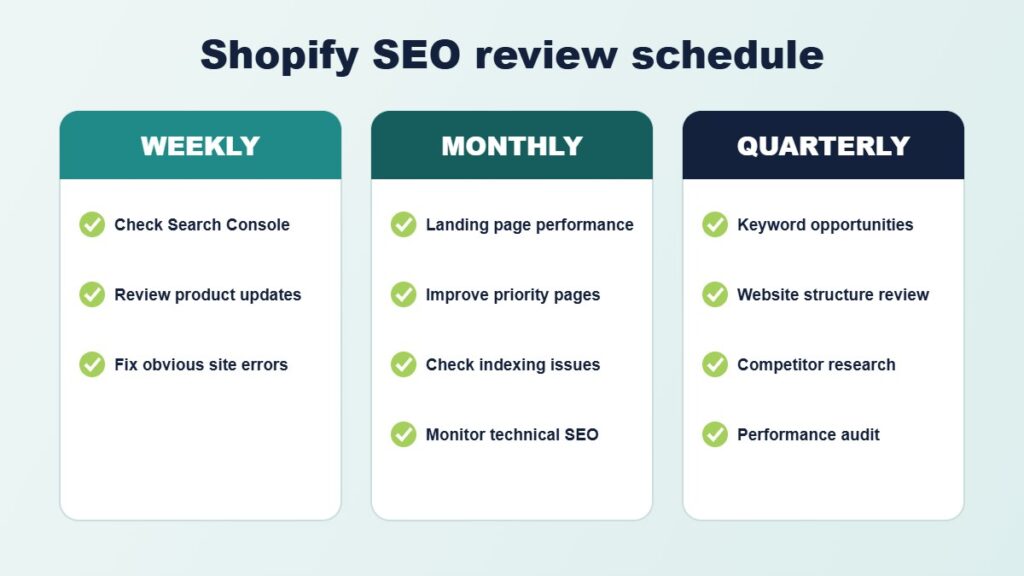
Weekly
Review Google Search Console for significant changes, check important product updates and investigate any obvious website errors.
Monthly
Review organic landing-page performance, improve priority products and collections, check new indexing issues and monitor technical SEO.
Quarterly
Assess keyword opportunities, review your website structure, investigate competitors and audit website performance.
For larger Shopify stores, more frequent reviews may be appropriate.
The important thing is to establish a manageable process and focus on improvements supported by your business data.
Frequently Asked Questions About Shopify SEO
Is Shopify good for SEO?
Yes. Shopify provides built-in features such as editable SEO titles, meta descriptions, canonical URLs, sitemaps and mobile-friendly themes. However, effective SEO still requires suitable content, a clear website structure and ongoing optimisation.
Do I need a Shopify SEO app?
Not necessarily. Shopify already includes many essential SEO features. Additional tools may be useful for reporting, bulk content management or specialist technical requirements, but they shouldn't replace proper keyword research and content planning.
How long does Shopify SEO take to work?
Results vary depending on your existing website, competition, search demand and the work completed. Some improvements may be reflected relatively quickly, while competitive organic growth often requires sustained effort over several months.
Should I optimise products or collections first?
Both are important. Collections are often suitable for broader product-category searches, while product pages target specific items. Prioritise pages with strong commercial relevance, existing search visibility and opportunities for improvement.
Can I use AI to write Shopify product descriptions?
Yes. AI can assist with drafting content and reviewing large product catalogues. However, descriptions should be checked for accuracy, originality and usefulness before publishing. Never invent product specifications, materials or compatibility information.
Can Shopify SEO help my Australian business compete with larger retailers?
SEO can help smaller businesses reach customers searching for specific products or specialist categories. Focusing on relevant product information, useful collections and distinctive expertise may provide opportunities that broader retailers don't serve as effectively.
Final Thoughts: Improving Shopify SEO in 2026
Improving your Shopify website's search visibility involves more than choosing keywords and editing meta descriptions.
Successful eCommerce SEO combines useful product information, well-structured collections, reliable technical foundations and a good shopping experience.
For Australian businesses, the goal should be to attract relevant visitors who are interested in the products you actually sell.
Start by reviewing your current organic search performance, identifying underperforming pages and prioritising the improvements that will provide the greatest value.
As your catalogue grows, continue monitoring website performance and keeping product information accurate.
Even relatively small improvements to important collections and product pages can contribute to a stronger long-term SEO strategy.
Need Help With Shopify SEO in Australia?
At iScreenviewer, I provide Shopify development, eCommerce website improvements and SEO support for Australian businesses.
I work directly with business owners to review their existing websites, identify technical problems and implement practical improvements.
Whether your Shopify store needs better product descriptions, SEO-optimised collections, technical fixes, website speed improvements or Google Analytics support, I can help you improve the foundations of your online store.
My Shopify and SEO services include:
- Shopify website audits and technical SEO.
- Product and collection SEO optimisation.
- Shopify theme development and improvements.
- Image alt text and metadata optimisation.
- Website performance and mobile usability.
- Google Search Console and GA4 configuration.
- Google Merchant Center support.
- Ongoing website maintenance and SEO improvements.
You work directly with the developer completing the improvements, with clear communication and practical recommendations.
Explore iScreenviewer Website Development and SEO Services
Contact iScreenviewer to Discuss Your Shopify Store
Fixed-Price Packages That Can Help

Prefer to have it done for you? These fixed-price packages cover the work in this guide, with no hourly billing:
- Keyword Planning, Schema Markup and AI Search Visibility: A$599
- Collection and Category SEO: 10 Collections: A$349
- Product Listing and SEO Batch: A$200
- SEO and Analytics Health Check: A$399
Not sure which one you need? Book a free website consultation or request a custom quote.
Related Articles
- How to Get Your Business Found in AI Search: Keyword Planning, Schema and AI Visibility
- How to Write Product Listings That Rank on Google (Shopify and WooCommerce)
- SEO and Analytics Health Check: 10 Signs Your Website Needs an Audit
- How to Set Up Google Analytics 4 and Google Search Console (Step-by-Step Guide)
- Shopify 2.0 Features: What Matters for Your Online Store