

Magento powers thousands of online stores, from small Australian retailers to large B2B catalogues. That popularity also makes it one of the most targeted eCommerce platforms on the internet.
Attackers look for Magento stores running outdated versions, unpatched extensions, weak admin passwords and exposed server files. A single gap can lead to stolen customer data, card-skimming malware on the checkout, defaced pages or a store that Google flags as unsafe.
The good news is that most Magento compromises are preventable. Keeping the platform patched, locking down the admin and monitoring for changes closes off the majority of attacks.
In this guide, I'll walk through how to secure your Magento website in 2026, with a practical checklist covering updates, admin protection, server hardening, extensions, payment page security, backups and monitoring.
Whether you run Magento Open Source or Adobe Commerce, these steps will help protect your store, your customers and your reputation.
Quick Answer: How Do You Secure a Magento Website?
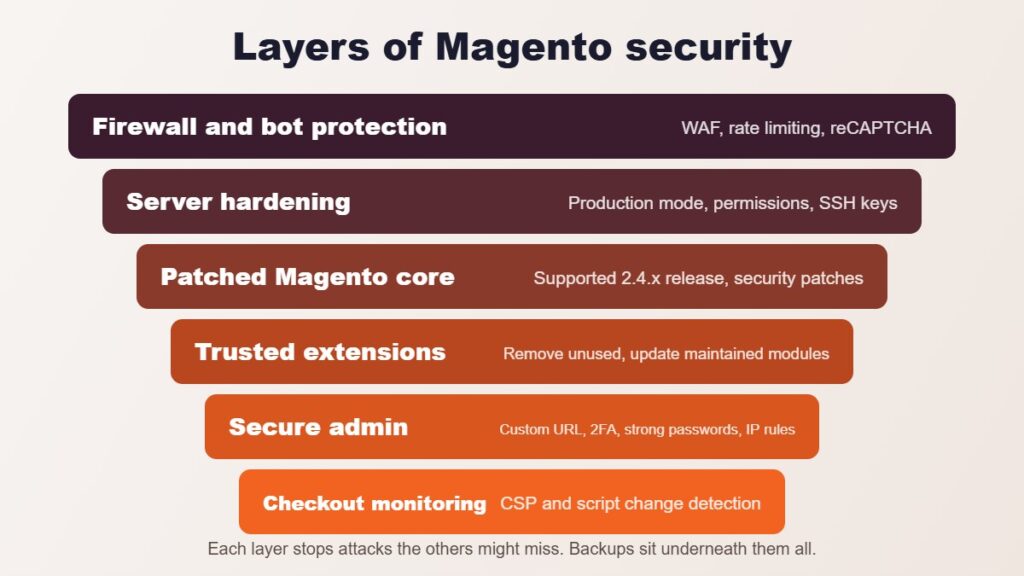
To secure a Magento website, run a supported version and install every Adobe security patch promptly, protect the admin with a custom URL, two-factor authentication and strong unique passwords, remove unused extensions, harden file permissions and server access, use a web application firewall, monitor your checkout scripts for unauthorised changes and keep tested off-site backups.
| Security area | What to do |
|---|---|
| Updates | Stay on a supported 2.4.x release and apply security patches quickly |
| Admin access | Custom admin URL, 2FA, strong passwords, IP restrictions |
| Extensions | Remove unused modules and only install trusted, maintained extensions |
| Server | Correct file permissions, production mode, no exposed files, SSH keys |
| Checkout | Content Security Policy and script monitoring to stop card skimmers |
| Protection | Web application firewall, malware scanning and HTTPS everywhere |
| Recovery | Automated, off-site backups that are regularly test-restored |
Why Magento Stores Are a Target
Magento stores process payments and hold customer names, addresses, email addresses and order histories. That makes them valuable to attackers.
Common Magento attacks include:
- Card skimming (Magecart): malicious JavaScript added to the checkout that copies card details as customers type them.
- Account takeover: stolen or guessed admin and customer passwords used to log in.
- Remote code execution: attackers exploit an unpatched vulnerability to run their own code on the server.
- Malicious extensions: abandoned or nulled modules containing backdoors.
- Spam and SEO injection: hidden links or pages inserted to promote other websites.
Recent critical vulnerabilities show how quickly attacks follow a disclosure. CosmicSting (CVE-2024-34102) in 2024 and SessionReaper (CVE-2025-54236) in 2025 both affected large numbers of unpatched Magento and Adobe Commerce stores within weeks of being announced.
The lesson is simple: the longer a store goes without patches, the higher the risk.
1. Run a Supported Magento Version
Security starts with running a version of Magento that still receives security patches.
Adobe publishes support dates for each 2.4.x release line. At the time of writing:
| Release line | Regular support ends |
|---|---|
| 2.4.9 | 31 May 2029 |
| 2.4.8 | 31 May 2028 |
| 2.4.7 | 31 May 2027 |
| 2.4.6 | Ended 11 August 2026 |
Extended support for some older release lines is available to Adobe Commerce customers only. Magento Open Source stores on an unsupported version no longer receive regular security fixes.
If your store still runs Magento 1, an early 2.x release or 2.4.6 or earlier, upgrading should be your first priority.
Check the official Adobe Commerce released versions page for current dates.
How to check your version: run bin/magento --version on the server, or look at the footer of the Magento admin dashboard.
2. Apply Security Patches Promptly
Adobe releases security patches on a regular schedule, along with urgent hotfixes when a critical vulnerability is discovered.
Patch releases use the -p suffix, such as 2.4.7-p10 or 2.4.8-p5.
Best practice is to:
- Subscribe to Adobe security bulletins and Magento security news.
- Apply critical patches within days, not months.
- Test patches on a staging site before deploying to production.
- Keep a record of which patches have been applied.
- Use the Adobe Commerce Security Scan Tool to check for known issues.
Delaying patches is one of the most common reasons Magento stores are compromised.
3. Secure the Magento Admin Panel
The admin panel controls your products, orders, customers and configuration. If an attacker gets in, they can inject malicious code directly through the admin.
Use a Custom Admin URL
Avoid the default /admin path. A custom, hard-to-guess admin URL reduces automated login attempts.
Enable Two-Factor Authentication
Magento 2.4 includes built-in two-factor authentication for admin users. Keep it enabled for every admin account and use an authenticator app rather than SMS where possible.
Restrict Admin Access by IP
Where practical, limit admin access to known office or VPN IP addresses at the web server or firewall level.
Review Admin Users Regularly
Remove former staff, agencies and contractors who no longer need access. Give each person their own account with only the permissions they need, rather than sharing a single login.
Use Strong, Unique Passwords
Require long, unique passwords and a password manager for everyone with admin access. Never reuse admin passwords across other websites.
4. Audit and Minimise Third-Party Extensions
Extensions add useful features, but every module is additional code that can contain vulnerabilities.
Review your installed extensions and:
- Remove modules you no longer use, rather than just disabling them.
- Only install extensions from reputable developers or the Adobe Commerce Marketplace.
- Never use nulled or pirated extensions, which frequently contain backdoors.
- Check that each extension is still maintained and compatible with your Magento version.
- Apply extension security updates as soon as they are released.
Fewer, well-maintained extensions mean a smaller attack surface.
5. Harden the Server and File System
Magento security depends heavily on the hosting environment.
Key server hardening steps include:
- Run Magento in production mode, not developer mode.
- Set correct file and folder permissions, with code files not writable by the web server where possible.
- Make sure
app/etc/env.php,.gitfolders, backups and database dumps are never publicly accessible. - Serve the site from the
pubdirectory as the web root. - Use SSH keys instead of passwords and disable direct root login.
- Keep PHP, MySQL or MariaDB, OpenSearch, Redis and Varnish on supported, patched versions.
- Use separate database credentials for each environment.
Managed Magento hosting providers handle many of these tasks, but it's worth confirming exactly what is included.
6. Protect the Checkout From Card Skimming
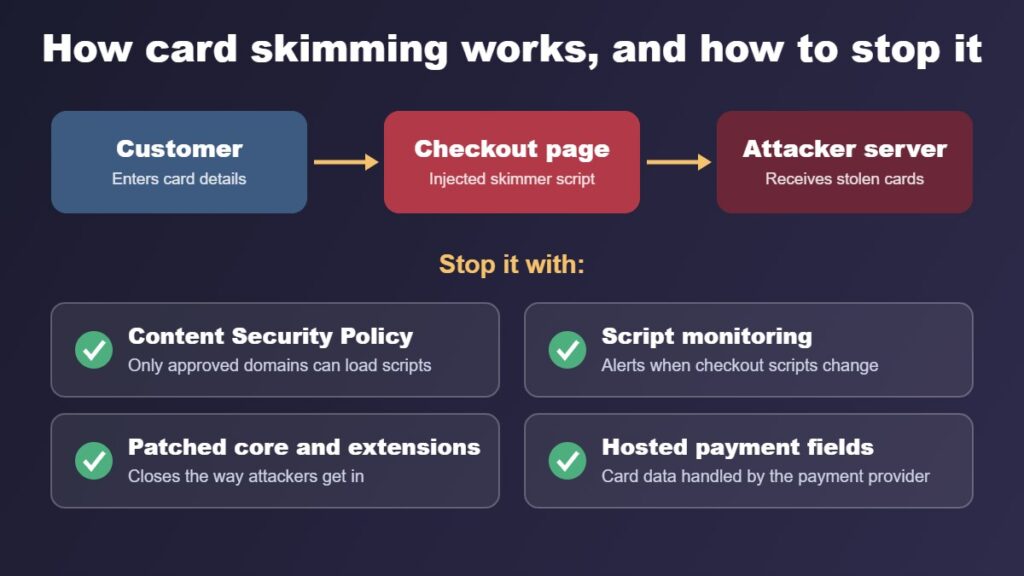
Card skimming, often called Magecart, is one of the most damaging attacks on Magento stores. Malicious JavaScript is added to the checkout and quietly sends card details to the attacker.
Customers may not notice anything, and the store owner often only finds out when the bank or payment provider reports fraud.
To reduce the risk:
- Keep Magento's Content Security Policy (CSP) enabled and review which external domains are allowed to load scripts.
- Monitor checkout pages for new or changed scripts.
- Remove tracking and marketing scripts that aren't needed on payment pages.
- Use a hosted or tokenised payment method so card details are handled by the payment provider.
- Review admin-editable areas such as CMS blocks, design configuration and miscellaneous scripts for unexpected code.
PCI DSS v4.0.1 requirements 6.4.3 and 11.6.1, which became mandatory on 31 March 2025, require merchants to manage and monitor scripts on payment pages and detect unauthorised changes. Magento 2.4.7 and later include features to help with these requirements.
7. Use HTTPS and a Web Application Firewall
Every page of your Magento store should load over HTTPS, including the admin.
Configure Magento's secure base URLs, redirect all HTTP traffic to HTTPS and enable HTTP Strict Transport Security (HSTS) once you're confident everything works over HTTPS.
A web application firewall (WAF), such as Cloudflare, Fastly or a host-provided firewall, can block many common attacks before they reach your server. This includes malicious bots, brute-force login attempts and known exploit patterns.
A WAF is not a replacement for patching, but it adds a valuable extra layer of protection.
Read more: Why use Cloudflare to secure your website.
8. Enable Bot Protection and CAPTCHA
Automated bots attack login forms, account registration, contact forms and checkout pages.
Magento includes Google reCAPTCHA support for areas such as customer login, registration, password reset, contact forms, checkout and the admin login.
Enable it on the forms that receive the most abuse, and consider rate limiting at the firewall level for login and API endpoints.
9. Keep Secure, Tested Backups
Backups are your recovery plan if something goes wrong.
A good Magento backup strategy includes:
- Automated daily database backups.
- Regular backups of code, media and configuration files.
- Copies stored off the server, in a separate location.
- Several restore points, not just the most recent backup.
- Regular test restores to confirm backups actually work.
If a store is compromised, a clean backup from before the attack can significantly reduce downtime. Restoring alone isn't enough, though. The vulnerability that allowed the attack must also be fixed.
10. Monitor for Malware and Suspicious Changes
Many compromises go unnoticed for weeks. Monitoring helps you find problems early.
Useful monitoring includes:
- Malware scanning of files and the database.
- File integrity monitoring to detect unexpected code changes.
- Alerts for new admin users or permission changes.
- Uptime monitoring and checkout testing.
- Reviewing server, admin action and payment logs.
- Google Search Console security issue notifications.
Tools such as the Adobe Commerce Security Scan Tool and specialist Magento malware scanners can help identify known threats.
11. Secure APIs and Integrations
Magento connects to ERPs, inventory systems, shipping providers, marketplaces and marketing platforms through its APIs.
Review your integrations and:
- Remove integrations and access tokens that are no longer used.
- Give each integration only the API permissions it needs.
- Store credentials securely and rotate them when staff or providers change.
- Keep connected applications and middleware updated.
Old integrations with broad permissions are an easy target if their credentials leak.
12. Use a Safe Deployment Process
Changes made directly on a live store increase the risk of mistakes and make it harder to track what changed.
A safer process includes:
- Version control, such as Git, for all custom code.
- A staging environment that mirrors production.
- Testing patches, upgrades and extensions before release.
- Deployment scripts rather than manual file uploads.
- No FTP access to production servers.
This makes it easier to apply security patches quickly and roll back if needed.
13. Train Your Team
People are often the easiest way into a system.
Make sure everyone with admin or hosting access understands:
- How to recognise phishing emails and fake login pages.
- Why passwords must never be shared or reused.
- How to report suspicious activity.
- Who to contact if they think the store has been compromised.
A short, clear security process is far more useful than a long policy nobody reads.
14. Have an Incident Response Plan
Even well-maintained stores can be targeted. Knowing what to do in advance saves time and reduces damage.
Your plan should cover:
- Who to contact, including your developer, host and payment provider.
- How to put the store into maintenance mode if needed.
- How to preserve logs and evidence.
- How to clean the site, close the vulnerability and restore from a clean backup.
- When to reset admin, database and API credentials.
- How to notify affected customers and authorities where required.
Australian businesses covered by the Privacy Act may need to notify the Office of the Australian Information Commissioner (OAIC) and affected individuals under the Notifiable Data Breaches scheme. Cyber incidents can also be reported to the Australian Cyber Security Centre through ReportCyber.
Magento Security Checklist: Quick Summary
Use this checklist to review your store:
- Run a supported Magento 2.4.x release.
- Apply all security patches promptly.
- Use a custom admin URL and two-factor authentication.
- Remove unused admin accounts and enforce strong passwords.
- Restrict admin access by IP where possible.
- Remove unused or untrusted extensions.
- Run production mode with correct file permissions.
- Block public access to sensitive files and folders.
- Enable Content Security Policy and monitor checkout scripts.
- Use HTTPS everywhere and a web application firewall.
- Enable reCAPTCHA on high-risk forms.
- Keep automated, off-site and tested backups.
- Monitor for malware and unexpected changes.
- Review API integrations and access tokens.
- Use version control and a staging environment.
- Document an incident response plan.
Read more: How Much Does a Website Redesign Cost in Australia in 2026?
Frequently Asked Questions About Magento Security
Is Magento secure?
Yes, Magento can be very secure when it runs a supported version, receives security patches promptly and is hosted and maintained properly. Most Magento compromises happen on stores that are out of date, use vulnerable extensions or have weak admin security.
How often should I update Magento?
Apply security patches as soon as practical after Adobe releases them, ideally within days for critical issues. Plan larger version upgrades before your release line reaches the end of its support period.
How do I know if my Magento store has been hacked?
Warning signs include unexpected admin users, unfamiliar code in CMS blocks or design settings, new scripts on the checkout, customer reports of card fraud, sudden redirects, spam pages in Google results and security warnings from Google Search Console or your payment provider.
What is the Adobe Commerce Security Scan Tool?
It is a free tool from Adobe that scans your store for known vulnerabilities, missing patches and signs of malware. You can schedule regular scans and receive the results by email.
What should I do if my Magento store is hacked?
Contact your developer and host immediately, preserve logs, put the store into maintenance mode if needed, remove the malicious code, fix the vulnerability, reset all credentials and restore from a clean backup if required. Inform your payment provider and assess whether you have notification obligations under the Notifiable Data Breaches scheme.
Is Magento Open Source still supported?
Yes. Magento Open Source continues to receive releases and security patches from Adobe. However, each 2.4.x release line has its own support period, so it's important to stay on a supported version.
Should I move from Magento to Shopify or WooCommerce?
It depends on your requirements. Magento suits complex catalogues and custom B2B functionality but needs ongoing technical maintenance. Smaller stores sometimes find Shopify or WooCommerce simpler to manage. Read my comparison: Shopify vs WooCommerce for Australian Small Businesses.
Final Thoughts: Keeping Your Magento Store Secure
Magento security isn't a one-off task. New vulnerabilities are discovered regularly, and attackers move quickly once they are made public.
The most effective protection comes from a few consistent habits: staying on a supported version, patching promptly, securing the admin, limiting extensions, monitoring the checkout and keeping reliable backups.
If your store hasn't been reviewed recently, start with a version check and a security scan. Those two steps alone will tell you a lot about your current risk.
Need Help Securing Your Magento Website?
At iScreenviewer, I help Australian businesses maintain, upgrade and secure their eCommerce websites.
I work directly with store owners to identify security risks and implement practical fixes, without unnecessary jargon.
My Magento Security and Maintenance Services
- Magento security audits and health checks.
- Security patch installation and version upgrades.
- Malware detection, removal and site recovery.
- Admin hardening and two-factor authentication setup.
- Extension audits and clean-up.
- Checkout script monitoring and CSP configuration.
- Backup, staging and deployment setup.
- Ongoing Magento maintenance and support.
You work directly with the developer completing the work, with clear communication throughout.
Explore iScreenviewer Website Development Services
Contact iScreenviewer for a Magento Security Review
Fixed-Price Packages That Can Help
Prefer to have it done for you? These fixed-price packages cover the work in this guide, with no hourly billing:
- Malware Cleanup: Entire Site: A$499
- Website Support and Maintenance: 6 Months: A$1,199
- Website Speed Optimisation and Core Web Vitals: A$449
Not sure which one you need? Book a free website consultation or request a custom quote.